---
title: Add To Homescreen
localeTitle: أضف إلى الشاشة الرئيسية
---
## أضف إلى الشاشة الرئيسية
هنا يركّز إعلان تثبيت تطبيق الويب على تطبيق الويب ، مع ميزة إضافة إلى الشاشة الرئيسية.
### دعم المستعرض لإضافة إلى الشاشة الرئيسية
يتم دعم وظيفة "إضافة الشاشة الرئيسية" حاليًا من خلال:
* كروم
* iOS سفاري
يمكنك الاطلاع على أحدث حالة لدعم المتصفح لهذه الميزة [هنا](https://caniuse.com/#feat=web-app-manifest) .
### على Android
على Android ، يظهر شعار "الإضافة إلى الشاشة الرئيسية" تلقائيًا إذا كنت تستوفي متطلبات معينة. هذا ما يجب أن يبدو عليه على Android:
| أضف إلى الشاشة الرئيسية السريعة عند إطلاق التطبيق | | : ----------------------: | : ---------------: | | 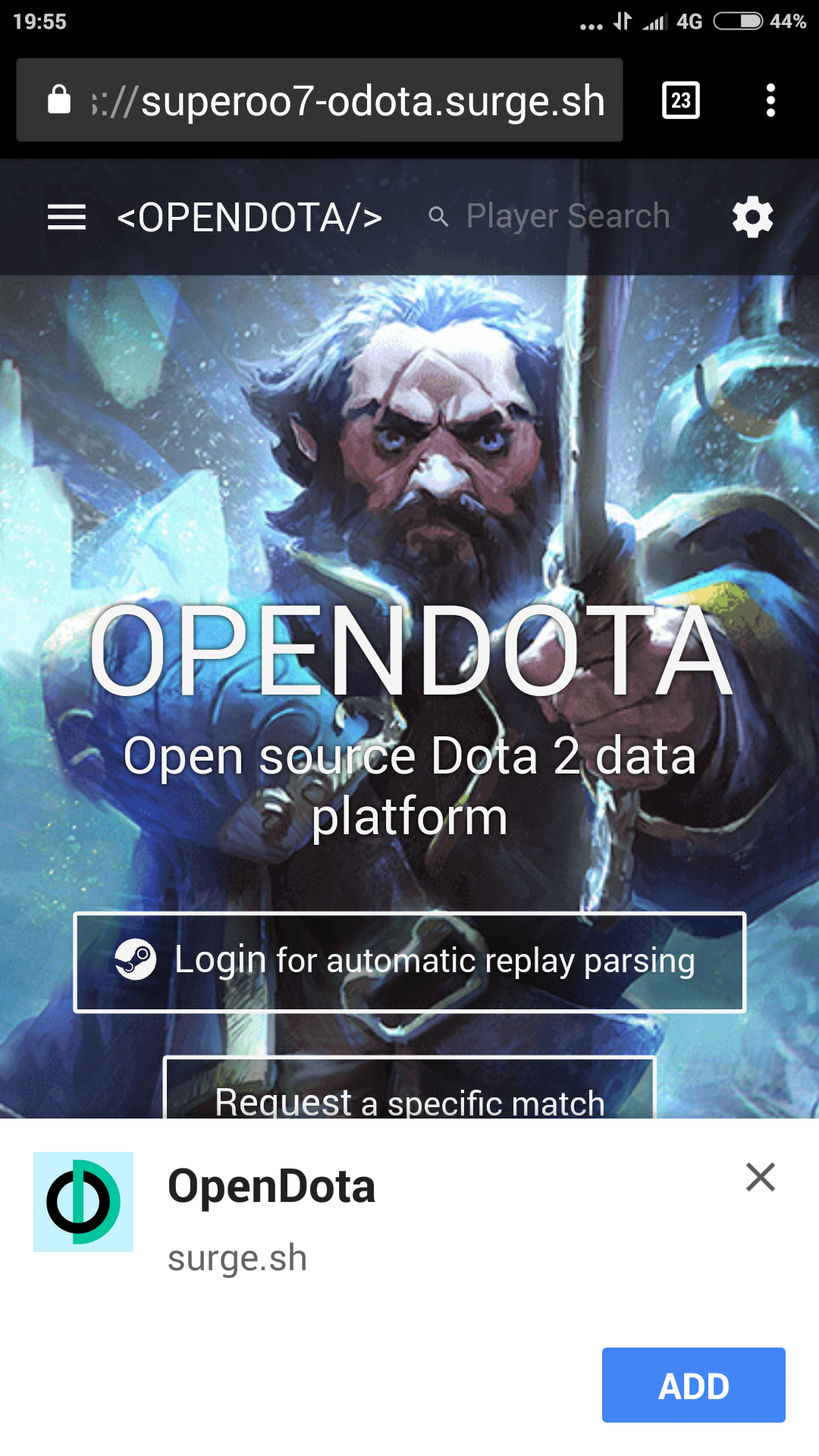 |  |
#### المتطلبات
* تضمين ملف `manifest.json` مع الخصائص التالية:
* `short name`
* `name`
* `192x192` حجم أيقونة `png`
* `start_url`
* تشمل عامل خدمة مسجل ومسجل
* عرض موقع الويب عبر HTTPS (لا يزال بإمكانك تجربة ذلك باستخدام localhost بدون HTTPS)
* يلتقي موقع الويب مع أساليب البحث المعرفي التي حددها Chrome
#### الملف manifest.json
`{
"name": "FreeCodeCamp",
"short_name": "FreeCodeCamp",
"theme_color": "#00FF00",
"background_color": "#00FF00",
"display": "standalone",
"Scope": "/",
"start_url": "/",
"icons": [
{
"src": "assets/images/icons/icon-72x72.png",
"sizes": "72x72",
"type": "image/png"
},
{
"src": "assets/images/icons/icon-96x96.png",
"sizes": "96x96",
"type": "image/png"
},
{
"src": "assets/images/icons/icon-128x128.png",
"sizes": "128x128",
"type": "image/png"
},
{
"src": "assets/images/icons/icon-144x144.png",
"sizes": "144x144",
"type": "image/png"
},
{
"src": "assets/images/icons/icon-152x152.png",
"sizes": "152x152",
"type": "image/png"
},
{
"src": "assets/images/icons/icon-192x192.png",
"sizes": "192x192",
"type": "image/png"
},
{
"src": "assets/images/icons/icon-384x384.png",
"sizes": "384x384",
"type": "image/png"
},
{
"src": "assets/images/icons/icon-512x512.png",
"sizes": "512x512",
"type": "image/png"
}
],
"splash_pages": null
}
`
* `name` هو اسم تطبيق الويب. (سيتم عرضه في شاشة الإطلاق)
* `short name` هو `short name` القصير لتطبيق الويب. (سيتم عرضه أسفل رمز قائمة الهاتف)
* `theme_color` هو لون الجزء العلوي من المستعرض.
* `background_color` هو لون خلفية شاشة الإطلاق.
* `display` هو الطريقة التي ينبغي تطبيق الويب العرض أطلقت مرة واحدة على الهاتف.
* تحدد `start_url` عنوان url الخاص بموقع الويب.
* `icons` عبارة عن مصفوفة تقوم بتخزين كل موقع الصور وأحجامها ونوعها.
### على الأجهزة الأخرى
على الرغم من أن هذه الطريقة لا تعمل على نظامي التشغيل iOS و Windows ، فهناك طريقة احتياطية.
**دائرة الرقابة الداخلية**
على نظام التشغيل iOS ، يجب إضافة زر "إضافة إلى الشاشة الرئيسية" يدويًا. أضف علامات meta tag التالية إلى قسم الرأس في HTML لدعم رمز تطبيق iOS على الويب.
`
`
**شبابيك**
على هاتف Windows ، أضف علامات meta التالية إلى قسم الرأس في HTML:
`
`
### المراجع
1. [superoo7 ، "نظرة عالية المستوى لتطبيق الويب التقدمي" تم النشر في: 18 كانون الأول 2017.](https://steemit.com/web/@superoo7/a-high-level-view-of-progressive-web-app)
2. [مات جاونت وبول كينلان ، "لافتات تثبيت تطبيق الويب" تم النشر في: 14 من تشرين الثاني 2017.](https://developers.google.com/web/fundamentals/app-install-banners/)